
{{ blogdata.headline }}
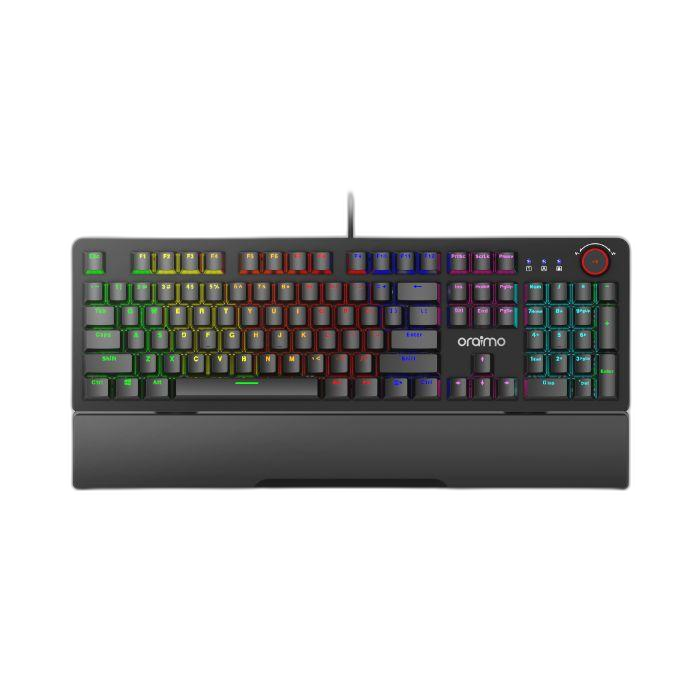
The Oraimo Hyper Type Wired Mechanical Keyboard (model OGG-MKD71) is a blue-switch mechanical keyboard with rainbow backlighting, a metal and ABS frame and a USB 2.0 wired connection. Oraimo lists it at ₦41,900 on ng.oraimo.com, a price checked on 14 October 2026. At the time of writing it holds a 4.8 out of 5 rating from 1,927 reviews on Oraimo's own store.
This is a research-based review. ABS Vendor has not tested this keyboard. Everything below comes from Oraimo's official specifications and from what verified buyers report on Oraimo's store, and we have flagged the complaints as clearly as the praise.

| Price on Oraimo (2026-10-14) | ₦41,900 |
| Store rating | 4.8/5 (1927 reviews) |
| Material | Metal & ABS |
| Rated Voltage | 5~0.25V |
| Rated Power | 1W |
| Supported Operating systems | Window XP/7/8/8.1/10; Mac OS X V10.4 or higher |
| Plug-in Type | USB 2.0 |
| Model | OGG-MKD71 |
Who the Oraimo Hyper Type is for
Oraimo describes the Hyper Type as built for long gaming sessions at home or in a cafe, and the buyer reviews back that up. The clearest fit is someone moving up from a laptop keyboard or a cheap membrane desktop keyboard who wants mechanical feel without paying enthusiast prices.
- Laptop-only users making the switch: one verified buyer said they had used laptop membrane keyboards for years and found this a joy to use after three weeks.
- Gamers on a budget: the blue switches, 5 customizable macros and 14 rainbow backlight modes plus 3 DIY modes are aimed squarely at fast-paced gaming and typing.
- People who type for long stretches: Oraimo includes an ergonomic wrist rest, and one buyer called the arm rest topnotch.
- Anyone who wants plug and play: there is no software to install, which one buyer confirmed is the entire customisation story here.
It is not for you if you need a wireless desk, if you work in a shared or quiet room, or if you want per-key software remapping. More on all three below.
Sound, typing feel and key features
The headline feature is the blue switch. Oraimo promises highly-responsive keystrokes with crisp key clicks and pleasant typing feedback, and buyers repeatedly describe the keys as crispy and fast to respond. One buyer said the sound the buttons make when typing gives a cool vibe. That is the honest shape of it: blue switches are loud and tactile by design, and the feedback is the point.
Lighting is the second selling point. Oraimo states 14 rainbow backlight modes and 3 DIY backlight modes, with adjustable brightness and lighting speed. Buyers describe the lights as giving and the display as very functional, and one said it beats the lighting on a conventional keyboard.
Other stated features:
- Build: metal and ABS construction, which Oraimo calls fashionable and durable.
- Macros: 5 customizable macros, so several operations can be completed with a single macro command.
- Compatibility: Windows XP, 7, 8, 8.1 and 10, plus Mac OS X v10.4 or higher, over a USB 2.0 plug-in connection.
- Power: rated voltage 5~0.25V and rated power 1W, drawn over USB.
One buyer also mentions a volume control. Oraimo's official feature copy does not list a volume control, so treat that as a buyer observation rather than a confirmed specification, and check the product page yourself before buying if it matters to you.
Practical use: power, placement and daily life
Because this is a USB 2.0 wired keyboard rated at 1W, it draws its power from the computer and needs no charging and no batteries. For Nigerian buyers that is a genuine advantage: no battery to run flat mid-session, and nothing to recharge when the light comes back after a NEPA outage. The trade-off is equally simple. It is tethered to the machine, so it is a desk keyboard, not something you throw in a bag for a commute.
The wired connection also means no pairing, no dongle to lose and no interference in a crowded flat or office. Plug it into a USB port and it works, which is exactly what one buyer reported.
Practical points worth planning around:
- Desk space: the keyboard includes an integrated wrist rest, so it takes up more depth than a bare keyboard. Measure your desk before ordering.
- Heat and humidity: Oraimo states a metal and ABS build. Metal surfaces stay cooler than soft-touch plastic in a hot room, but keep drinks away from any USB keyboard regardless.
- Laptop use: if you plan to use it with a laptop, you will be sitting at a desk rather than on a couch, since the cable ties you to a USB port.
Downsides and limits, from buyers and specs
The most consistent complaint is noise. One verified buyer put it bluntly: good luck typing fast on this thing in the middle of the night. If you share a room, work nights, or type in a quiet office, blue switches are the wrong choice, and this is a design trait rather than a fault.
The second complaint is missing media keys. The same buyer specifically missed next and previous media buttons for skipping tracks or podcast episodes without leaving the current window, and said they had those keys on previous laptops. If you listen to music or watch videos while you work, that is a real daily annoyance.
Third, customisation is limited. There is no software for setting dedicated keys, per that buyer. What you get is the 5 macros and the lighting modes. Two other buyers independently wished the keyboard had an on-board mouse or a cursor control joystick. That is not what this product is, and you should not expect it.
Finally, the price. ₦41,900 is a budget mechanical keyboard price, not a cheap accessory price. Prices on Oraimo's site change, so confirm the current figure on ng.oraimo.com before you order, and use our Oraimo discount code in the box below to bring it down if one is live.
What verified buyers say
Oraimo's store shows a 4.8 out of 5 rating from 1,927 reviews. The verified reviews supplied read positive overall, with the same few caveats repeating.
Praise: buyers call it a decent and inexpensive mechanical gaming keyboard, and one long-term laptop keyboard user said it had been a joy to use for three weeks. Another described it as the best, most affordable yet excellent RGB keyboard they had tried, with the arm rest called topnotch. A third called the keys crispy with good backlight modes, better than a conventional keyboard's lighting. A fourth said it was sleek, the lights were giving, the buttons respond fast, and it was a beautiful buy.
Complaints: no next or previous media buttons, which one buyer missed for skipping music and podcasts; loud typing noise, with the same buyer warning against fast typing late at night; and no software for setting dedicated keys, leaving lighting modes and 5 macros as the only customisation. Two buyers separately wished it had an on-board mouse or a cursor control joystick.
Verdict
Buy it if you want your first mechanical keyboard, you game or type at a desk you do not share, and you are happy with plug and play rather than software remapping. It suits laptop users stepping up to a proper keyboard, and anyone who wants rainbow lighting and a wrist rest without paying enthusiast money. The wired USB connection is a plus in a country where charging time and power cuts are a daily consideration.
Skip it if you need wireless, if you type at night in a shared room, if missing media keys would bother you daily, or if you expect per-key software customisation. Two buyers also wanted a built-in mouse or joystick, which this keyboard does not have. Confirm the current price on ng.oraimo.com before ordering, since the ₦41,900 figure was checked on 14 October 2026 and prices move.
See the Oraimo Hyper Type Wired Mechanical Keyboard on Oraimo's official store
Frequently asked questions
Is the Oraimo Hyper Type keyboard wireless?
No. It is a wired keyboard with a USB 2.0 plug-in connection. It draws power from the computer, so there is no battery to charge and no Bluetooth pairing. Oraimo's specifications list no wireless mode.
Will it work with my laptop or Mac?
Oraimo states support for Windows XP, 7, 8, 8.1 and 10, and Mac OS X v10.4 or higher, over a USB port. It is plug and play, so no driver installation is required.
Is it loud enough to disturb other people?
It uses blue switches, which are clicky by design. A verified buyer warned against typing fast on it in the middle of the night. If you share a room or work in a quiet office, plan for the noise.
How much does it cost in Nigeria?
Oraimo listed it at ₦41,900 on ng.oraimo.com, a price checked on 14 October 2026. Prices change, so confirm the current figure on Oraimo's site, and check the coupon box below for any live Oraimo discount code.
This article is based on Oraimo's published specifications and verified customer reviews on Oraimo's store, checked on 14 October 2026. ABS Vendor has not tested this product. Prices change, so confirm on Oraimo's site. ABS Vendor is an Oraimo affiliate partner and may earn a commission if you buy with our code.
Comments ({{ comments.length }})
{{ comment.comment }}
{{ reply.comment }}
No comments yet
Be the first to share your thoughts.
Sign in to join the conversation
Only registered members can comment, which is what keeps the spam out. Every comment is read before it appears.
Leave a comment
Comments are reviewed before they appear.